What are the causes and solutions for a white screen upon startup of an industri
Date:2026-01-09
What are the causes and solutions for a white screen upon startup of an industrial control LCD screen?
LCD industrial control liquid crystal displays are now ubiquitous devices, and the industrial sector has gradually adopted them. Occasionally, these displays may experience a white screen issue. So, how can we troubleshoot a white screen on an industrial control LCD display? Black screen and blue screen issues are common when an LCD industrial control display is turned on. Both black and blue screens indicate problems with the system or hardware, while a white screen upon startup is generally due to a fault in the LCD industrial control display itself.
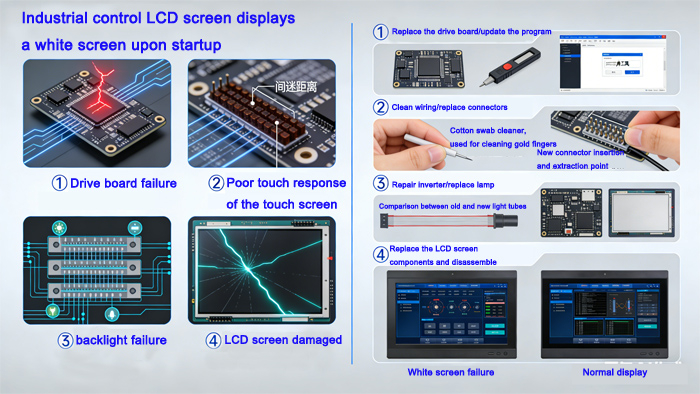
Failure causes of LCD industrial control display screen:
The white screen fault of an LCD industrial control display may be caused by three aspects: issues with the liquid crystal panel drive circuit, issues with the liquid crystal panel power supply circuit, poor contact of the screen cable, and issues with the mainboard control circuit. If the industrial control display can be powered on normally, it indicates that the backlight and high-voltage generation circuit are working properly, suggesting that the liquid crystal panel is not receiving a drive signal. If the screen disappears after turning off the display and a white screen appears subsequently, it may be due to a problem with the power board.
This indicates that, regardless of whether the device is turned on or off, as long as the power is plugged in, the high-voltage generation circuit is in an operational state, and the backlight source is always illuminated. In other words, the high-voltage generation circuit is no longer controlled by the switch, meaning that the switch signal sent by the motherboard to the high-voltage generation circuit has lost control. Since the switch signal sent by the motherboard microprocessor generally needs to pass through several transistors for control, the fault may be due to damage to the transistors that control the switch signal.
LCD industrial control LCD screen fault maintenance:
1. Disassemble the casing and inspect whether the screen cable connector is loose or not properly connected.
2. Next, turn on the power switch, and then use a multimeter to measure whether the power supply voltage of the screen cable interface is normal. If the power supply voltage is normal, check whether the timing signals and drive signals in the liquid crystal panel drive circuit are normal; if they are not normal, then check whether the fuse resistor or fuse inductor near the screen cable output terminal is open or damaged. If it is damaged, simply replace the damaged component.
3. If the fuse resistor or fuse inductor near the screen cable output terminal is normal, proceed to check whether the output voltage of the DC-DC voltage conversion circuit supplying power to the LCD industrial control display is normal. If the output voltage is abnormal, inspect components such as the fuse resistor, PWM controller, switch transistor, inductor coil, and filter capacitor in this power supply circuit, and then replace any damaged components.
4.If the voltage at the output terminal of the DC-DC voltage conversion circuit is normal, it indicates that there are damaged components such as capacitors between the output terminal of the DC-DC voltage conversion circuit and the screen cable interface. Simply inspect and replace the damaged components.
5. If the power supply voltage of the flat cable interface is normal, proceed to check whether the timing signals and drive signals in the liquid crystal panel drive circuit are normal. If they are abnormal, inspect the output signals, input signals, and power supply voltage of the chip that generates these signals to determine whether the drive chip is damaged. If it is damaged, simply replace it.
AUO LCD DISPLAY:https://www.auo-lcd.com/products/auo-lcd-screen/