eDP stands for Embedded DisplayPort. It is a digital display interface used inside a device to carry video from the graphics hardware or a display bridge to a built-in panel. An "eDP LCD screen" is an LCD panel that receives video through this interface; eDP is not a type of liquid crystal or a screen-quality grade.
The interface is used in products such as laptops, all-in-one PCs and embedded display systems. VESA's eDP overview explains its role in connecting graphics hardware to an internal display. The exact capabilities still depend on the panel and the host system.
How an eDP display interface works
The source sends video to the panel's receiver, which works with the display electronics to produce an image. The video path and the communication used to configure the link have different roles.
Two important parts of the eDP connection| Part | Role |
|---|
| Main Link | Carries video data from the source to the display over high-speed data lanes. The supported lane count and link rate must match the system's requirements. |
|---|
| AUX channel | Provides bidirectional communication for configuration and link management. Supported implementations can also use it for panel or backlight control. |
|---|
For a concrete hardware example, Texas Instruments lists one-, two- and four-lane eDP operation for the SN65DSI86 bridge. That is a specification for one device, not a promise that every eDP panel supports all of those configurations.
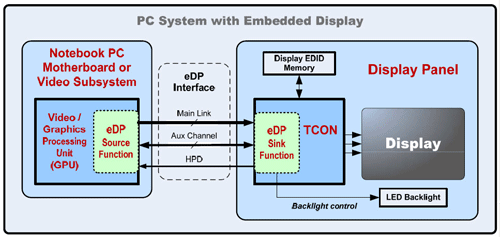
Simplified connection example, not a connector pinout or wiring instruction. Intel's eDP description identifies HPD as optional. Check power connections and control details in the exact product documentation.
What are the advantages of eDP?
Efficient internal video connections. eDP was developed to support embedded displays with fewer interconnect signals and reduced wiring requirements compared with older LVDS implementations. VESA's eDP 1.2 announcement also describes AUX-based panel and backlight controls. Actual cable construction and electromagnetic performance remain design-specific.
Flexible display bandwidth. Lane configuration and link rate allow implementations to support different video requirements. Features such as Display Stream Compression are described in VESA's eDP 1.4a announcement. Do not assume that a feature in the standard is available or enabled on every panel and controller.
Power-saving options. Supported systems can use features such as panel self-refresh, which allows the display to retain a static image while reducing activity elsewhere in the system. The available functions and resulting savings depend on the complete implementation and workload; the eDP label alone does not establish a power-consumption figure.
Does eDP determine resolution or viewing angle?
No. The interface name does not specify the panel's native resolution, viewing angle, contrast or color performance. Read those values from the panel specification. A higher-resolution mode must also be supported by the source, link configuration and display electronics.
For example, IPS describes a liquid-crystal operating mode, while eDP describes a display interface. A panel can be both IPS and eDP. Choosing an eDP connection does not turn a narrow-viewing-angle panel into a wide-viewing-angle one, and it is not proof of better image quality than an LVDS panel.
How to identify an eDP LCD panel
Start with the complete model code. Record the label, suffix and revision, then obtain the matching panel specification. Confirm that the interface is explicitly identified as eDP. Do not identify it from screen size, connector appearance or a seller's abbreviated description alone.
Check the intended source. Confirm the host or controller's documented output, supported video modes and required configuration. An eDP panel does not necessarily connect directly to every processor; some systems use a bridge between different video interfaces.
For a replacement, verify the connector pin assignment, cable, power requirements and mechanical drawing before connection. Keep these checks model-specific. Do not experiment by connecting an unverified cable or changing supply voltages.
Is eDP the same as an external DisplayPort connector?
eDP is based on DisplayPort technology but is intended for embedded display connections. An internal panel connector is not automatically interchangeable with the DisplayPort socket on a desktop monitor or graphics card. A proposed connection needs an appropriate controller or adapter design and a check of the exact panel requirements.
Frequently asked questions
Does an eDP display automatically include touch?
No. Touch sensing and video display are different functions. An eDP specification alone does not confirm that a panel includes a touch sensor, touch-processing hardware or the required host support. Check what the supplied assembly actually includes.
Are all 30-pin or 40-pin eDP screens compatible?
No. Pin count alone does not identify the pinout, supported link configuration, power and backlight requirements, connector position or mounting dimensions. Compare the specifications of the original panel, proposed replacement and host together.
Can an eDP panel replace an LVDS panel?
Not as a direct interface substitution. The source and destination use different interface requirements; a cable that fits is not proof of compatibility. For the conversion-specific checks, read the eDP vs LVDS conversion checklist.
Need help selecting an eDP LCD panel?
Use the industrial eDP selection guide to prepare a model review. Send the full panel model or label photo, host or controller model, required size and resolution, application, quantity and delivery country. State whether the existing controller and cable must be retained.
Request an eDP panel review
Compatibility requires review of the exact specifications and validation in the intended equipment. Panel availability, price, lead time and any controller or cable supply must be confirmed individually.